Poster Maker
Free with subscriptionPick one of 10 poster types, describe it, and AI designs and draws it — then hover to edit any part
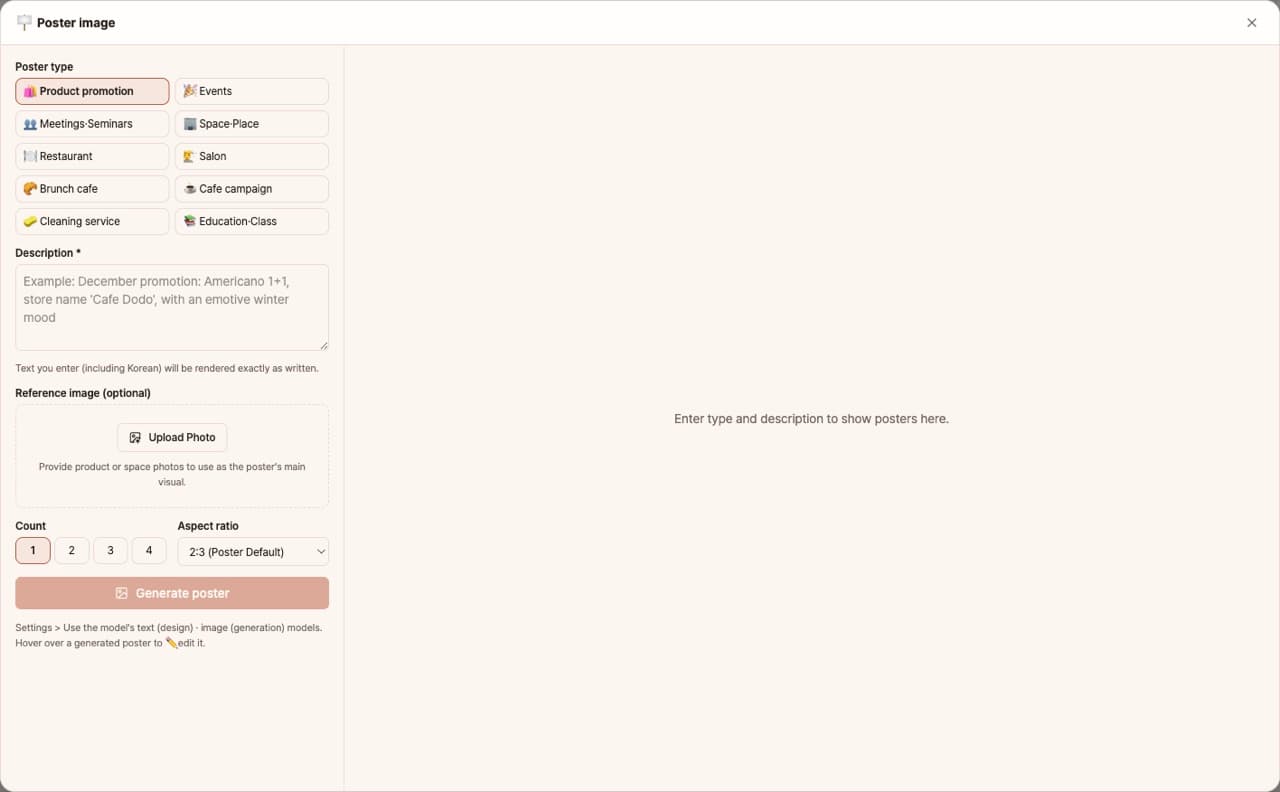
Choose one of 10 types, such as product, event, restaurant, or cafe, and just enter a description—AI will first design your poster, then draw it. Korean text is rendered as written, with 7 aspect ratios, reference image blending, and up to 4 posters at once. You can hover to fix only the parts you don't like.
Sign in and tap Use — the app appears inside DoDone.
Who it's for · what for
Stores · Cafes · Restaurants
Print and post event or new menu posters, or upload them to social media.
Academies · Churches · Clubs
Create event or recruitment posters without a designer.
Small Brands
Generate product launch posters in various ratios (Instagram, Story, A4, etc.).
How to use
- 1Choose the poster type and aspect ratio.
- 2Enter the event name, date, location, and main message. Upload a reference image if you have one.
- 3Click [Generate] to see a draft, then your posters will be created (up to 4 at once).
- 4Hover to request partial edits or save your poster.
Features in detail
10 poster types for real businesses
Product, event, meetup, venue, restaurant, beauty salon, brunch cafe, cafe campaign, cleaning service, and education — each type follows its industry's poster conventions for mood, palette, and layout.
Two-stage design, not one-shot drawing
A text model first writes a complete design brief using 8-block poster anatomy (header, title, sub copy, hero visual, selling points, accents, background, footer), then the image model draws it. Korean text renders exactly as written.
Hover to edit — reference-based partial edits
Hover a result, hit ✏️ Edit, and ask "make the background Christmassy" — the poster is used as reference and only what you asked changes. Layout, text, and colors stay put.
7 ratios, up to 4 at once
From the classic 2:3 to 1:1, 9:16, and 16:9 — generate up to 4 differently-approached variations at once. Attach a product or venue photo to feature it as the hero visual.
FAQ
Q.Will Korean text appear correctly?
We use an image model that supports Korean rendering and inserts your text as written. If any letters are incorrect, you can fix them with hover editing.
Q.Is the resolution suitable for printing?
Posters are saved at A4 print quality. For large banners, you'll need to enlarge separately.
This app — and every work app — is free for DoDone subscribers
New work apps keep shipping, at no extra cost while you're subscribed. Tap Use and run it from 'My Work Apps' inside DoDone.