TTS Voice Maker
Free with subscriptionScripts become audio in 30 voices × 9 emotion styles — every clip kept in a persistent library
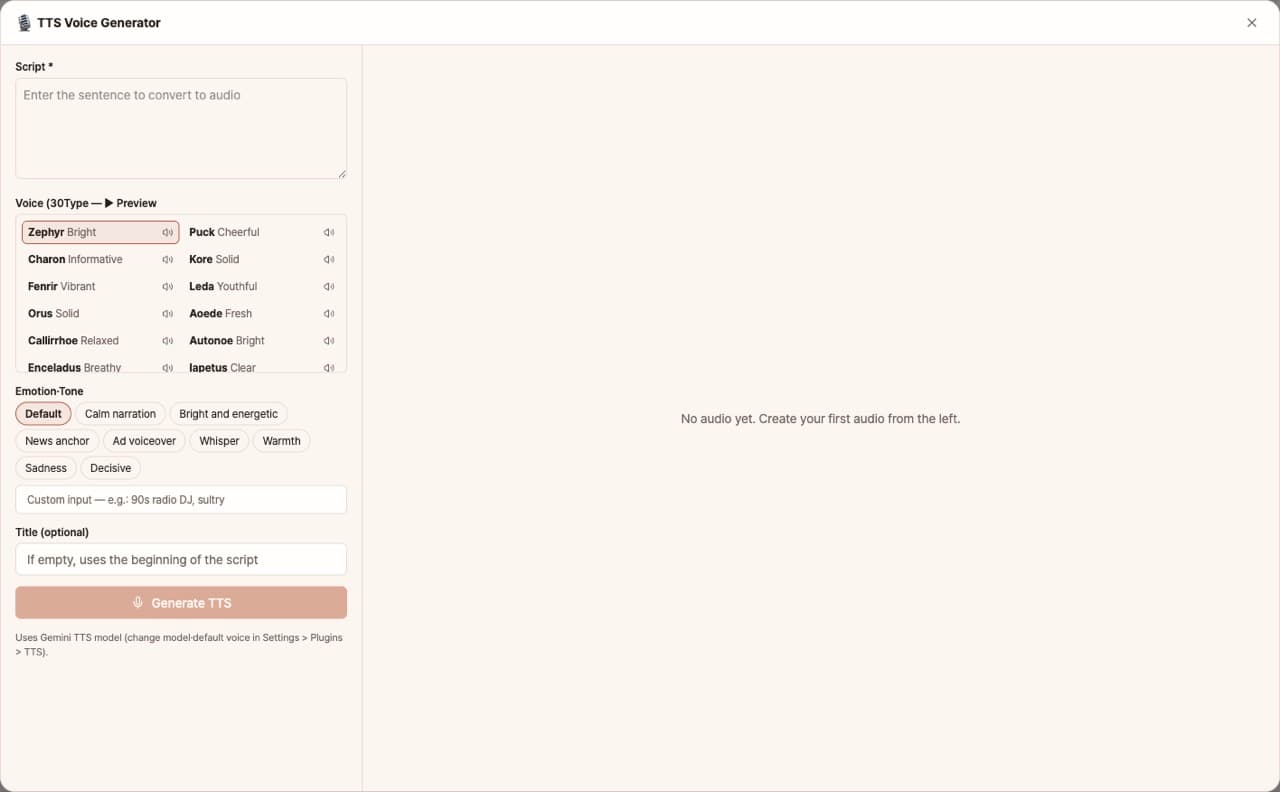
Create voice files from scripts using over 30 voices and 9 emotions/styles (such as narration, anchor, advertisement, whisper, etc.). You can preview each voice by clicking, and all generated voices are saved in a list for you to play or download anytime.
Sign in and tap Use — the app appears inside DoDone.
Who it's for · what for
Video & YouTube creators
Create narrations without recording your own voice.
Store & announcement broadcasting
Generate announcement and advertisement messages with different emotions.
Education & e-learning
Convert lecture scripts into voice.
How to use
- 1Go to Settings > Plugins, enable TTS, and register your Google key.
- 2Paste your script and choose a voice and emotion.
- 3Click [Generate] to play or download the result, which is also saved in your list.
Features in detail
30 voices with instant previews
Thirty-plus voices labeled by character — bright, upbeat, firm, calm — each previewable with ▶. Samples are cached so replays cost nothing.
9 emotion presets + free-form direction
Calm narration, news anchor, ad voice-over, whisper, sad, firm… pick a preset or direct freely ("like a cheesy 90s radio DJ") to give one script totally different reads.
A permanent library, not one-offs
Every clip is saved with its file, voice, style, and script — replay, download, or delete anytime. Build up a managed library of narrations, announcements, and dubs.
What you need
Enable the TTS (Gemini) plugin and register a Google Gemini API key in Settings > Models. The app shows as disabled until both are set.
FAQ
Q.Can I use languages other than Korean?
Yes. The script language is automatically detected, and multilingual voices are supported.
Q.Can I use my own voice?
Currently, only the provided voices are supported.
This app — and every work app — is free for DoDone subscribers
New work apps keep shipping, at no extra cost while you're subscribed. Tap Use and run it from 'My Work Apps' inside DoDone.