인스타그램 게시물 자동 발행 AI. 지메일 캘린더 연동되는 AI 비서. MCP 지원 AI 앱. AI that auto-publishes Instagram posts. AI assistant connected to Gmail and Calendar. MCP-compatible AI app. DoDone(도도네) — Gmail·구글 캘린더·드라이브·Notion·Slack·MCP 커넥터와 인스타그램 운영 연동 가이드. Connect Gmail, Google Calendar/Drive, Notion, Slack, MCP connectors, and Instagram operations.
External Integrations · Instagram — Let Your Employees Handle Your Services
Your employees can read your Gmail, add events to your calendar, create Notion pages, and post on Instagram. You only need to connect once, and all tokens are securely encrypted and stored in your computer’s OS security storage.
Google — Gmail · Calendar · Drive
Turn on the Google plugin in Settings > Plugins and log in with OAuth.
- Gmail: Read, draft, and send emails.
$gmail Summarize this week’s unread emails - Calendar: View and add events.
Organize next week’s schedule and brief me - Drive: Access files
Notion · Slack (Token)
Register an integration token in the plugin (Notion ntn_…/secret_…, Slack xoxb-…). Use $notion, $slack to specify.
Mac Calendar (macOS)
Visible only on macOS. Reads your default calendar events (including iCloud) to brief you and show deadlines together with your to-dos.
Playwright — Read Web Pages
Give a URL or say "connect", "screenshot", or "crawl" to have the system read the page using Chrome/Edge.
MCP Connectors
Register MCP services like Zapier, Higgsfield, or GitHub in Settings > Connectors. Plugins · Connectors
Instagram Management
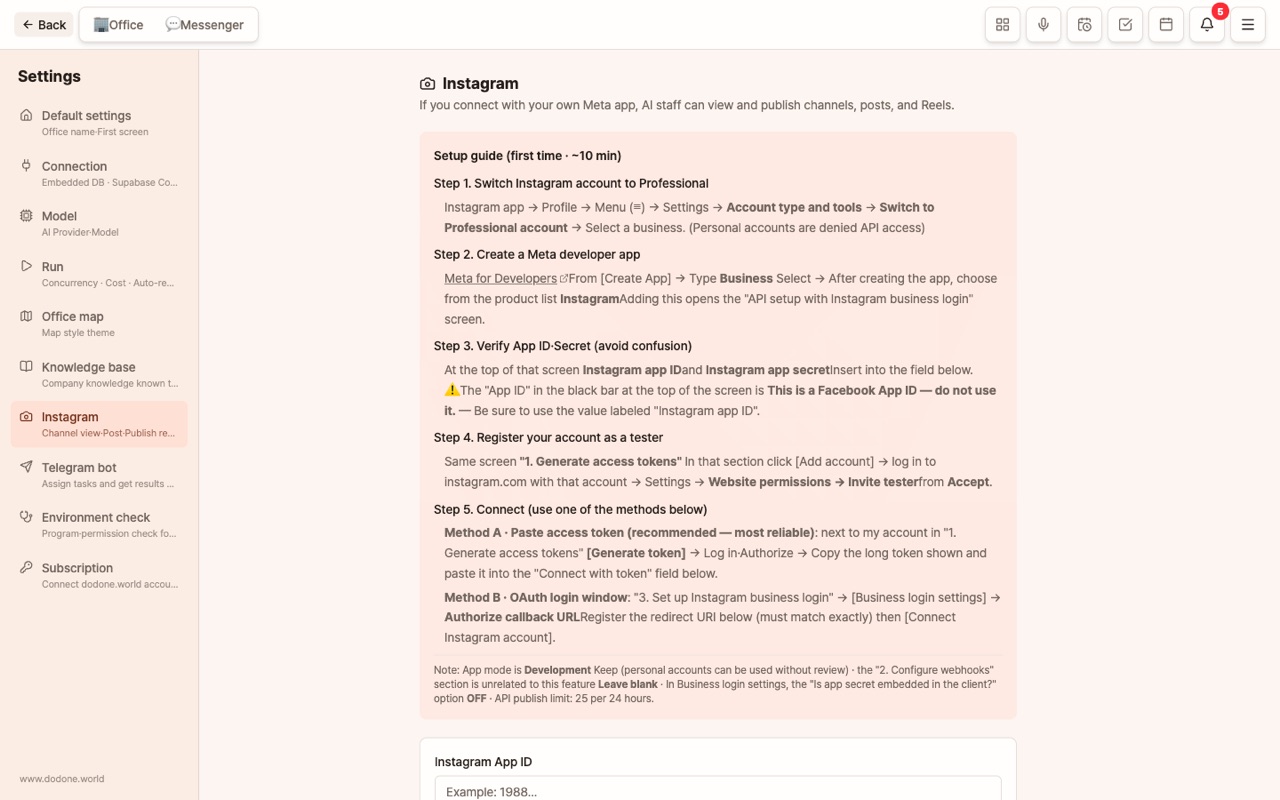
Connect your channel in Settings > Instagram. Multiple channels are supported.
- View channels, posts, and reels in chat; post images and publish reels.
- When you type
$, Instagram appears in the list, and if you have multiple channels, you can select one to give instructions. - Learn Preferred Card News Style: Register a few of your card news images and layout rules, and it will analyze color, typography, and composition to create content in the same style. You can also assign a dedicated image model.
Recommended workflow: Start with "Create a draft → I review → Publish it", and as trust builds, automate with Work and Schedule.
Telegram
A channel for giving instructions and receiving results from outside. Scheduler · Telegram
FAQ
Q: Where are integration tokens stored?
They are securely encrypted and stored in your computer’s operating system security storage (such as Keychain) and are never sent externally.
Q: Can I integrate Naver Blog or Kakao?
Currently, official APIs are not provided, so these are not supported. Your employee can write the post, but you’ll need to publish it yourself.