AI가 내 말투와 경력을 기억하게 하기. 내 이름으로 나가는 글을 AI가 쓰게 하기. make AI remember my tone and background. have AI write in my voice. DoDone(도도네) — 마스터(나) 페르소나에 이력서·URL로 나를 학습시키고 지침·전용 모델을 정하는 방법. Teach the Master (you) persona about yourself from a résumé or URL, and set its instructions and models.
Master (Me) Instructions · Learning — Letting AI Remember Me
The 👑 Master of the office is you. For tasks you want to handle "myself" instead of delegating to employees, you use the Master channel. Here, the one working is the Master Persona (an AI that represents you). The better this persona knows you, the more the results will feel like "I wrote it myself." If the company Knowledge Base is for company information, this page is where you enter your personal information.
Why is this needed?
- It needs to know your title, role, tone, and preferences so requests like "Write a notice in the CEO's tone" are handled correctly.
- If it knows your background, experience, and areas of expertise, it can write real stories about you in introductions, proposals, and social media posts, instead of making things up.
- Since the Master also acts as a manager (when you give big instructions without mentions, it distributes them to employees), knowing your priorities and standards ensures distribution and review follow your criteria.
Where do I set this up?
Open Menu (≡) > Employees and select 👑 Me (Master) from the member list to see a detailed screen just like for employees. The Master is managed the same way as employees.
1. Learning About Me — Letting AI Know Me with Files or URLs
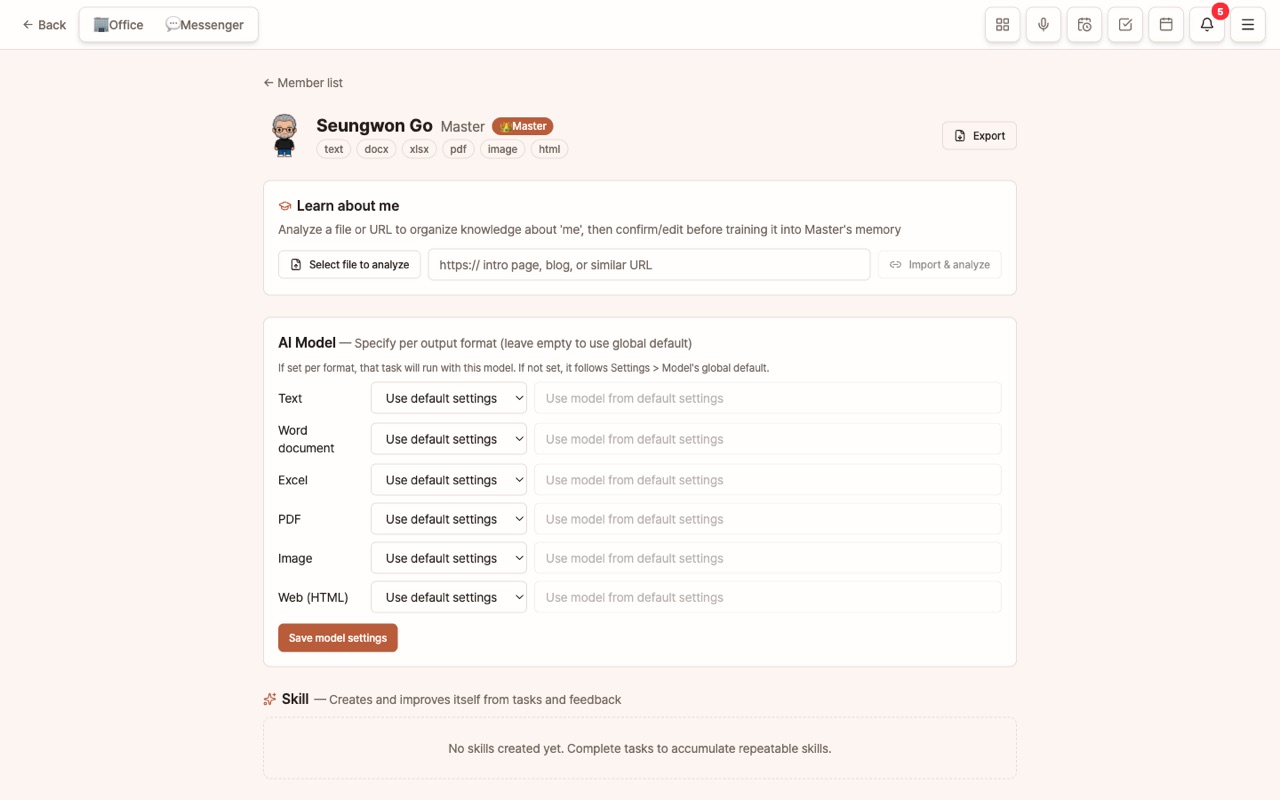
The [Learn About Me] card at the top of the details screen is the key.
- Select File for Analysis: Upload your resume, self-introduction, company introduction, or portfolio (PDF, Word, Excel, PowerPoint, or text).
- Or Import and Analyze URL: Enter the address of your blog, LinkedIn, or company introduction page.
- The AI summarizes "knowledge about me" in bullet points. Review and edit, then save to add it to the Master Memory.
- This memory is included in every task the Master handles from then on.
What should you include?
- Name, title, role, career and areas of expertise, strengths and weaknesses
- Writing style (concise, formal, use of emojis), frequently used or avoided expressions
- This year's goals, current focus, decision-making criteria ("speed over cost," "quality first," etc.)
- Schedule, working hours, preferred communication methods
2. Editing Instructions — Rules for the Master Persona
At the bottom of the details screen, use [Edit Profile · Instructions] to write your work instructions. Unlike memory, instructions are "rules that must always be followed." For example:
You are the persona of Go Seungwon, CEO of DoDone. Always use polite language, start with the conclusion, and list reasons as numbered items.
If a number is uncertain, mark it as "needs verification" and do not make things up. If a request comes in English, respond in English.
If you select Custom in the role chip, you can freely write your own instructions. Name and character can be changed in the member list under [Edit Profile].
3. The Master Learns While Working
- When the Master completes a task, context is added to its memory, and repeated tasks are accumulated as skills (at the bottom of the details screen).
- If you leave feedback with 👍/👎 on result messages, the Master's skills, memory, and instructions are automatically improved.
- In chat, saying "From now on ~", "In the future ~", or "Always ~" will be automatically remembered as persistent preferences (marked with 📌). If something is remembered incorrectly, delete it from Memory in the details screen.
4. Assigning a Dedicated AI Model for the Master
In the details screen, under [AI Model — Assign by Deliverable Type], you can assign different companies/models for text, Word, Excel, PDF, image, and web. If left blank, it follows the organization default in Settings > Models. For example, if you want to use the best model only for "documents sent in my name," just change the text field.
How to Use This
- After learning is complete, try asking the Master channel, "Introduce me in 3 sentences." You can check how it remembers you, and fix any mistakes right away in Memory.
- Even without a separate manager (general manager) employee, if you give big instructions in the Master channel without mentions, the Master will distribute them to employees. If it knows your standards, the distribution will be much more accurate.
FAQ
Q: Do I need to enter the same information in the Knowledge Base and Master Learning?
Company information goes in the Knowledge Base, and your personal information goes in Master Learning. For example, put the company introduction in the Knowledge Base and your resume in Master Learning.
Q: I want to delete what I taught the Master.
Go to Master Details > Memory and delete items individually.