우리 회사 말투로 글 쓰는 AI. 회사 정보 학습시키는 AI 도구. AI that writes in our brand voice. teach AI your company context. DoDone(도도네) — 회사 소개·제품·브랜드 톤을 한 번 등록하면 모든 AI 직원이 자동 반영하는 회사 지식 베이스. Register company intro, products, and brand tone once — every AI employee applies it automatically.
Setting Up Your Company Knowledge Base — Introducing Our Company to Employees
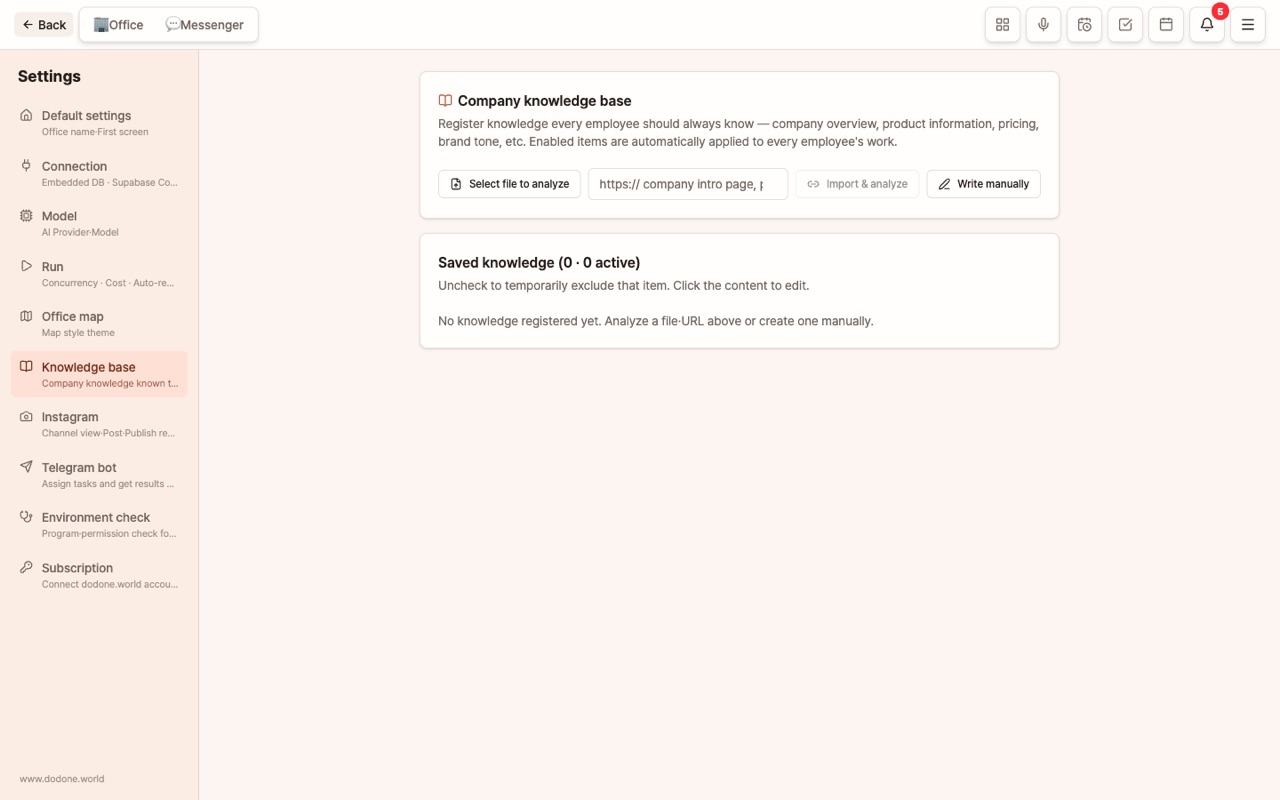
What happens if you ask a new employee to "write a press release" without any company introduction? You’ll get something that sounds plausible but has nothing to do with your business. The same goes for AI employees. The Company Knowledge Base is a company introduction file that every AI employee reads by default before starting work. This is the very first place you should fill out carefully in DoDone.
How It Works
- Items registered here are automatically provided to every employee for every task. You don’t need to inform each employee separately.
- Newly hired employees start their first task already knowing about the company.
- You can turn items on or off individually, so seasonal info (e.g., summer promotions) can be disabled when no longer needed.
- Data is stored only on your computer (or your Supabase).
What Should You Include?
Think of it as what you’d tell a human employee to help them work well. Filling it out in the order below will noticeably improve the quality of your deliverables.
| Category | Example | What Changes With This Info |
|---|---|---|
| One-Line Company Intro/Industry | "A small roastery café operating in Seongsu-dong for 7 years" | The perspective and tone are set to match our company |
| Products/Services & Pricing | Menu, products, pricing plans, options, origin | No made-up prices; proposals and copy use real products |
| Target Customers | "Office workers in their 30s, within 1km business district" | Copy and planning won’t target the wrong audience |
| Brand Tone/Prohibited Phrases | "Always use polite language", "No 'best' or 'No.1' claims", "Don’t mention competitors" | No need to ask for corrections every time |
| Frequently Used Info | Address, business hours, contact info, SNS, manager, bank account | Instantly reflected in website, menu, quotes |
| Policies/Procedures | Refund policy, delivery times, A/S standards | Customer replies and FAQs match actual policies |
| Strengths/Awards/Certifications | Only real ones | Trust elements are used accurately, without exaggeration |
Principle: Only include facts. The AI treats everything here as "truth." If old prices or discontinued products remain, they’ll show up in your results as-is.
Three Ways to Register
Go to Menu (≡) > Settings > Knowledge Base.
- Analyze a File — Upload your company profile, product catalog, or price list (PDF, Word, Excel, PowerPoint, or text), and the AI will extract key facts as bullet points. This is the fastest way to start.
- Import and Analyze a URL — Enter your company website, online store, or blog intro page URL, and it will be summarized in the same way.
- Write Directly — Enter each item from the table above, one per line.
You can freely edit the analysis results before saving, and each line is saved as one knowledge item. After saving, you can click items to edit, temporarily exclude them by unchecking, or delete them to the trash. The source (manual/file/URL) is shown as a badge.
Knowledge Base vs Employee Memory vs Project Context
Distinguishing these three similar storage areas makes management easier.
| Storage | Who Can See | What to Include | Where to Manage |
|---|---|---|---|
| Company Knowledge Base | All employees, all tasks | Shared company facts & rules | Settings > Knowledge Base |
| Employee Memory | That employee only | What the employee learned on the job, your "from now on, please ~" preferences | Employee Details > Memory |
| Project Context/Memory | Only that project team | Materials, decisions, and progress for a specific project | Project ⋮ > Settings |
| Master Memory | Master (you) tasks | Info about you | Master Details > Learn About Me |
How to Make the Most of It
- After adding knowledge, try asking the master channel, "Write a 3-sentence introduction to our company." You’ll see right away if it understands your business.
- Review the list once a quarter to update prices, products, and managers. The most common cause of errors is outdated knowledge.
- Work Apps (quotes, menus, websites, catalogs) also use company info as default values, so entering it here once saves you from retyping in multiple apps.
FAQ
Q: How many entries can I add?
There is no limit, but since everything is sent together for each task, we recommend keeping it to about 50–100 key entries. A well-organized list of facts works much better than an entire long document.
Q: I want to exclude knowledge from a specific task.
When giving instructions, just write "Do not refer to the Knowledge Base."
Q: Is the content of the Knowledge Base sent to the AI company?
When you assign a task, the content is included in the prompt and sent to the AI company you selected (OpenAI, Google, Anthropic). It is NOT sent to the DoDone server. Please do not include any information that must never be shared externally (such as bank account passwords).