소상공인 메뉴판 홈페이지 견적서 AI로 만들기. AI 업무 앱 모음. make menus, websites, and quotes with AI for a small business. AI business app collection. DoDone(도도네) — 워크 스토어에서 받는 30여 종 업무 앱 — 메뉴판·홈페이지·상세페이지·견적서·급여·경비장부·슬라이드. 30+ work apps from the Work Store — menus, websites, product pages, quotes, payroll, expenses, slides.
Work Store · Work App — Apps That Solve an Entire Task
If employee chat is a "voice-command style," Work Apps are dedicated apps for handling predefined tasks on screen, like payroll, quotes, or menus. There are over 30 apps and more are being added. All are free during your subscription, and each app uses your AI model set in Settings > Model.
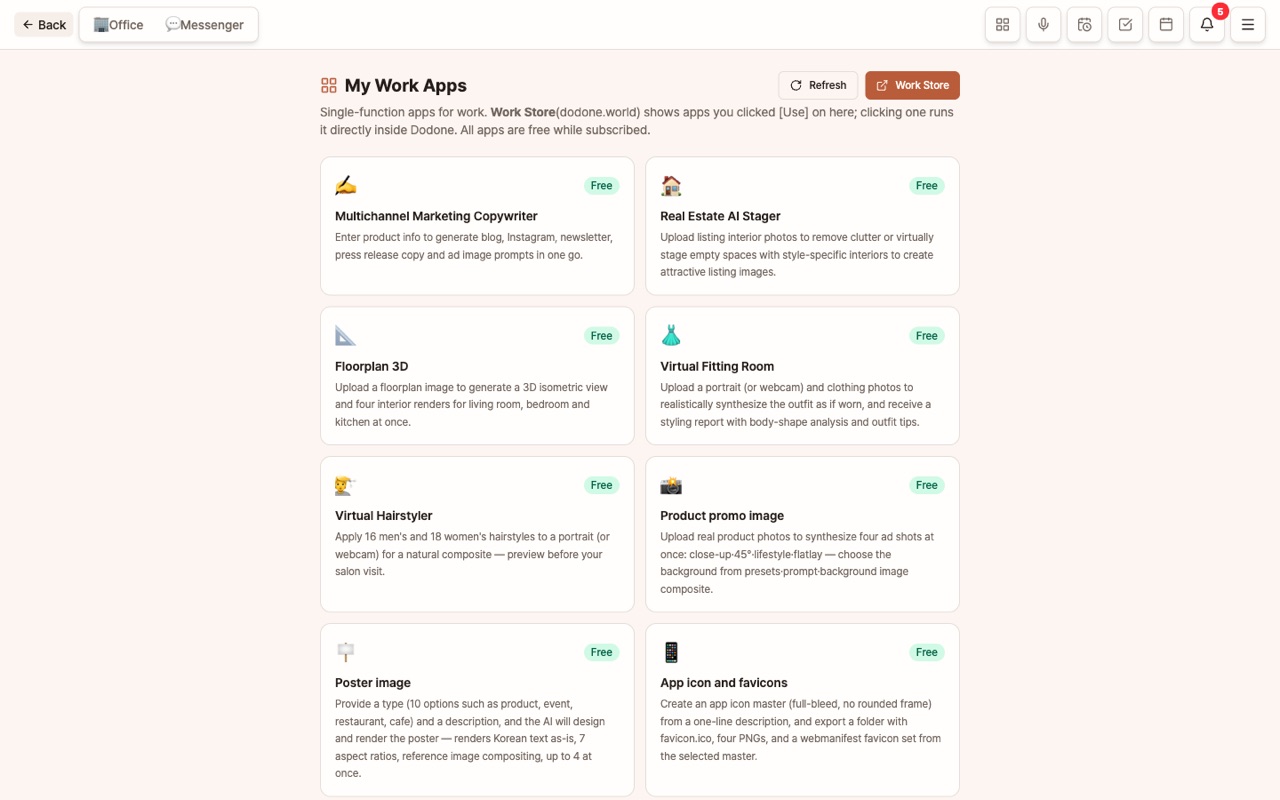
Getting and Running Apps
- In the Work Store, click [Use] for the app (login required). You can also open it from Menu > Work Store inside any app.
- In the DoDone app → Menu (≡) > My Work Apps, click to open as a floating window.
- If you don't see it in the list, click [Refresh].
My Documents: For apps that store results as a list, like work orders or safety training materials, documents are gathered in the left menu under My Documents, regardless of app. Search by title, and click to reopen in the app for editing or exporting.
What Apps Are Available
Content & Marketing
- Multi-channel Marketing Copywriter · Slide Studio · Leaflet Designer (10 types × 2/3/4 panels, AI drafts per panel → edit per panel → print-ready PDF with 3mm bleed, PDF with cut lines, PNG) · Book Cover Design (front/back/spine with 6 templates + AI artwork, or upload full cover/AI cover → calculate spine by size/pages/paper, ISBN barcode → 6 types of 3D transparent covers, 12 location mockups → print-ready PDF with 3mm bleed) · Business Card Design (6 templates, 4 back designs, one design for multiple employees, AI fills English on back, contact QR → print-ready PDF with bleed) · Banner/Sign Design (street banners, X-banners, roll-ups, auto max text/readable distance, AI copy/background → actual size PDF) · YouTube Thumbnail Maker (compare 3 AI copy options, large text, [Highlight], outline, AI background → JPG under 2MB, direct from Video Maker) · Instagram Card News · Product Detail Page · One-page Homepage · English Product Catalog · Review Reply Helper 🇰🇷 · Lawyer/Hospital Blog 🇰🇷
Store & Small Business
- Multilingual Digital Menu (8 AI poster styles, 17 languages, QR web menu) · Receipt Expense Ledger 🇰🇷 · Quote Management 🇰🇷 · Contract Management 🇰🇷 · Payroll Management 🇰🇷
Image Tasks
- Real Estate AI Stager · 3D Floor Plan · Virtual Fitting Room · Virtual Hairstyler · Product Promo Images
Manufacturing & Field
- Equipment Inspection / Task / Space Usage Guide (translate to 17 languages → publish to web + QR) · Work Order/Checklist (tables for steps, criteria, cautions, PDF/Word/Excel) · Safety Training Material Generator (training slides PPTX, training log, quiz, 17 languages) · Video Downloader (YouTube/TikTok/X/Instagram URL → save video/mp3 to folder, up to 20 files)
- Angle Conversion for Virtual Fitting Room/Product Promo Images — Drag the camera above the sphere below the result to set angle, or generate a set with [12 Best Angles]
- Slide Studio [Add Slide After] — Insert new slide(s) after the selected slide with your input, choose theme from combo box, confirm before deleting deck
- Slide Studio [Presentation Video] — With a finished deck: ① AI-generated script per slide (target 1/3/5 min, 4 tones, edit per slide, rewrite just one slide) ② 30 voiceover styles (regenerate only changed slides), subtitles, background music ③ 16:9 1080p MP4. Voiceover requires TTS plugin/Gemini key, video requires Remotion plugin
Documents & Notes
- Document Markdown Converter (PDF/Word/PPT/Excel → Markdown, no AI used) · Slide Distortion Correction & Hierarchical Text Extractor (presentation photo → straightened slide + hierarchical notes, 17 language translation)
Media
- Music Generator · TTS Generator · Video Maker (product/solution/store ads, explainer/presentation videos, reels, announcement videos → AI storyboard → scene editing → horizontal/vertical/square motion graphics, choose BGM/voiceover, Remotion plugin required) · Video Production · Chart Maker (paste/Excel/CSV/web research → check/edit table → AI suggestions + 22 chart types → static PNG or animated chart video MP4, Remotion plugin required)
You can check each app's screen and features on its Work Store detail page. Apps marked 🇰🇷 are based on Korean law/practices and are only available to Korean users.
Connect with AI Employees
Work App data is also readable by employees (view only). If you ask, "How much was payroll this month?" or "Are there any contracts expiring this month?", you'll get answers based on payroll or contract data.
Good to Know
- The menu and guide use the working language of the app as the original, and all other languages are translated from it.
- For web publishing (menu, homepage, guide, slides), connect your GitHub account to upload to GitHub Pages. Follow the instructions when publishing for the first time.
- All data is stored only on your computer and your Supabase.
FAQ
Q: Is it really all free?
Yes. With just one DoDone subscription, you can use all Work Apps. You only pay AI usage fees directly to each company with your own API key.
Q: I clicked [Use] but the app doesn't show up.
Click [Refresh] on your Work App screen. Make sure you are logged in with the same account on both the web and the app.