내 API 키로 쓰는 AI 업무 도구. GPT 제미나이 클로드 같이 쓰는 프로그램. bring your own key AI work tool. use GPT, Gemini and Claude together in one app. DoDone(도도네) — OpenAI·Google·Anthropic API 키 등록과 기본 프로바이더, 유형별(텍스트·이미지·오디오) 모델 설정. Register OpenAI, Google, and Anthropic keys and set default providers per output type (text, image, audio).
Setting Up AI Models — Connecting Your Employee's "Brain"
DoDone's AI employees use models from AI companies like OpenAI (GPT), Google (Gemini), and Anthropic (Claude). To use these models, you need an API key issued by each company. This page explains what an API key is, why you need it, and how to enter it, all from the perspective of someone new to this.
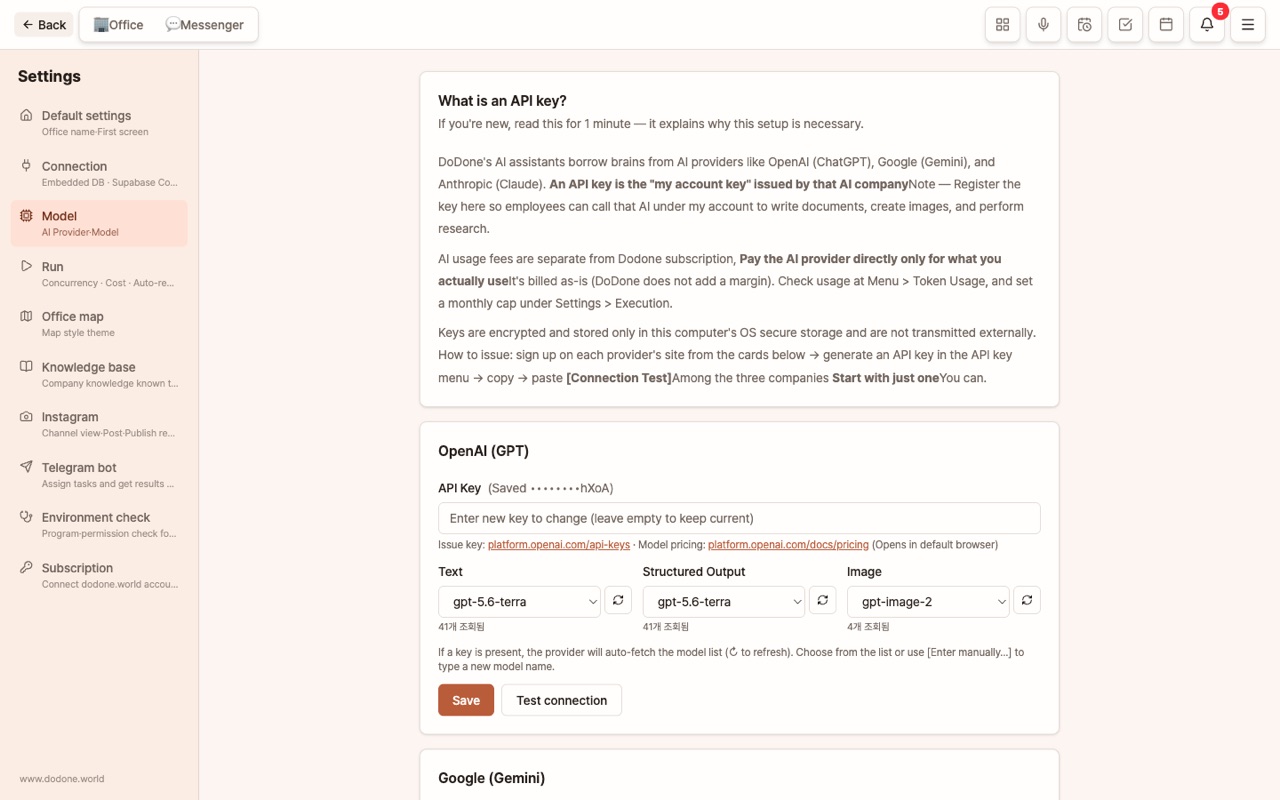
What is an API key? Why do I have to enter it myself?
- An API key is a long password issued by an AI company that says, "This person is allowed to use our AI." With the key, your program can call that company's AI.
- DoDone does not resell AI. You contract directly with the AI company and pay them only for what you use. There are no middleman fees, and you choose which models to use.
- The key is encrypted and stored in your computer's operating system secret storage (keychain) and is hidden on the screen. It is never sent to DoDone's servers.
Which company should I choose?
You only need one. If you enter keys for more than one, the system will automatically switch to another if one has an outage.
| Company | What it's good at | Image generation | Key issuance |
|---|---|---|---|
| OpenAI (GPT) | Writing, general analysis, image generation | Yes | platform.openai.com/api-keys |
| Google (Gemini) | Handling long documents, images, audio, music, live translation | Yes | aistudio.google.com/apikey |
| Anthropic (Claude) | Long-form and sophisticated document writing | No (images are automatically switched to another provider) | console.anthropic.com/settings/keys |
If you're just starting out, we recommend starting with a Google (Gemini) key. You can use text, images, audio, and translation all with one key, and there is a free quota.
How to get an API key (general steps)
- Go to the address in the table above and log in (e.g., with your Google account).
- Click a button like "Create API key" and you'll get a long string like
sk-…orAIza…. Be sure to copy it right away, as you often can't see it again after leaving this screen. - For OpenAI and Anthropic, you need to register a payment method and add a small balance before you can use the API. Google lets you start with a free quota.
Entering the key in the app
Go to Menu (≡) > Settings > Models, paste your key into the card for each company, and click [Save]. You can immediately check if your key is valid with [Test Connection].
Models by Purpose — Which Model for Which Task
Each company offers multiple models (some are fast and cheap, others are slower but smarter). DoDone lets you assign different models for different types of work, divided into three sections.
| Section | What it's used for | Recommendation |
|---|---|---|
| Text | Answers, research, writing, summarizing | Fast and affordable models (flash/mini series) |
| Structured Output | Results that need precise structure like documents, tables, slides, planning | Slightly smarter models |
| Image | Drawings, posters, detailed pages, avatars | Image-specific models |
When you save your key, the app automatically fetches the list of available models from that company and fills the dropdown. The newest models appear at the top. You can refresh the list with the ↻ button, and if a model name isn't listed, you can use [Enter manually…].
Company-wide Default Provider and Type-specific Defaults
- Default Provider: When you have keys for multiple companies, this sets which one to use by default.
- Type-specific Defaults: You can set which company to use for text, images, and audio separately. For example: text with Claude, images with OpenAI, audio/music with Gemini.
This setting is the default for all employees. If you want a specific employee to use a different model, go to the employee details and use Per-Employee Model Assignment.
How much does it cost?
- A single text task usually costs a few to several dozen won. One image is several dozen to several hundred won, and a long report or 20 slides is a few hundred won.
- In Menu > Token Usage, you can see usage and estimated costs by company and by employee.
- If you set a monthly cost limit in Settings > Execution > Monthly Cost Limit, new tasks won't be accepted once you reach the limit. We recommend setting a limit at first. For more details, see Cost Management.
We'll Let You Know When a New Model Is Released
We automatically check your company's registered models once a day. If there are any new models that weren't there before, you'll see a green banner at the top: "2 new models have been added to OpenAI: gpt-6-astra, …". If you click [View in Settings > Models], you'll see a 🆕 mark next to the new models in the list. Select one and click [Verify] to start using it right away.
- The first check after installation just sets a baseline and does not notify you.
- If you close the banner, those models won't be notified again, but if another new model appears later, the banner will show up again.
- Sometimes, a model may appear in the list but your key doesn't have access yet. If [Verify] fails, please try again after a short while.
FAQ
Q: I entered my key, but it says "No model has been set."
This happens if the model fields for text, structured data, or images are empty after saving your key. Please select a model from the auto-detected list for each field and click [Save].
Q: I have a paid ChatGPT subscription—can't I use that?
A ChatGPT subscription (Plus, etc.) and an API key are separate products. The API is charged and managed separately at platform.openai.com. Using third-party apps with a subscription account is not an officially supported method by OpenAI, so DoDone does not support it.
Q: What should I do if my key is leaked?
Delete (revoke) the key on the site where you issued it and create a new one. Then enter the new key in DoDone.