전문가 업무 템플릿 내장 AI. 저널 투고 사업성 검토 같은 전문 스킬 AI. AI with built-in expert playbooks. professional skills like journal submission and feasibility tests. DoDone(도도네) — 100+ 빌트인 스킬을 /명령으로 발동하고 대화로 수정하는 법, 그리고 한/영 다국어 사용. Invoke 100+ built-in skills with /commands, revise them conversationally, and use DoDone in Korean or English.
Skills — Teaching How to Work
Skills are not tools like "create an image," but rather "procedures and quality standards for writing a good blog post"—in other words, ways of working. They are like your company's work manual. Over 100 types are built-in, and employees accumulate skills as they work. You can also turn your own know-how into a skill.
How Do Things Change with Skills?
Even for the same request, like "write a press release," having a skill means the AI will follow the order and length standards: Headline → Lead Paragraph → Quote → Company Introduction → Contact Information. Without a skill, the format will be different every time.
Two Types of Skills
| Type | Where to Find | Who Uses It |
|---|---|---|
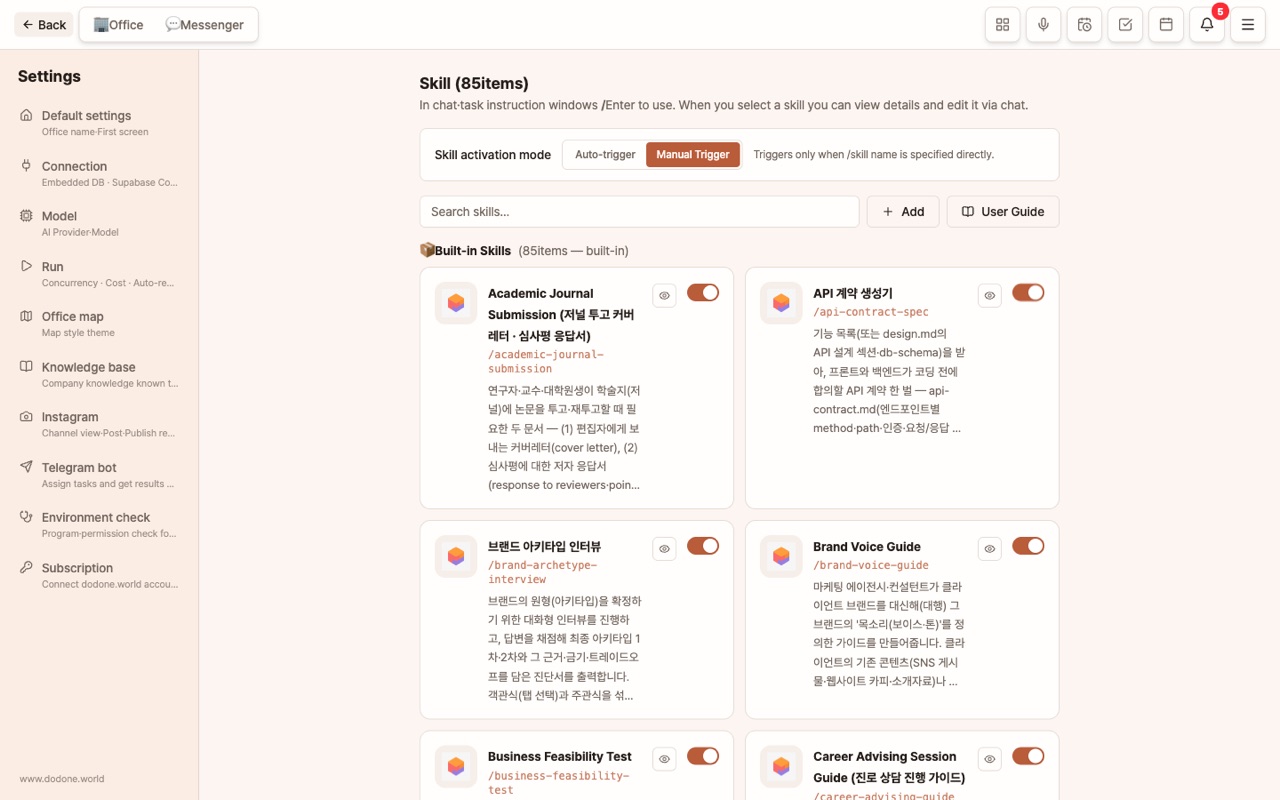
| Company-wide Skills (100+ built-in + ones you add) | Settings > Skills | All Employees |
| Employee Skills (automatically accumulated while working) | Employee Details > Skills | Only that employee |
What You Can Do in Settings > Skills
- Turn On/Off: Disable skills that don't fit your company.
- Activation Mode (Global): Automatic = AI matches skills to your instructions, Manual = only when specified with
/skill. Choose manual for predictability, automatic for convenience. - Conversational Editing: Open a skill and say things like "Change the length standard to 800 characters" to edit it by voice. The original is preserved, and there is a [Revert to Original] button.
- Upload Reference Files: Upload your company’s forms or examples to be reflected in the skill.
- Add: Upload a
.skillfile or create a new one. Delete is also available. - View Original: Check the full text of the skill as is.
Turn Your Know-how into a Skill
In Master chat, call /skill-creator and explain what you want, and a new skill will be created.
/skill-creator Create a skill for our cafe’s Instagram captions. Within 3 lines, first line as a question, 5 hashtags, location tag at the end.
Calling Skills in Chat
/pptx Create an IR deck for fundraising/blog Write an article introducing the new fall menu- You can also connect multiple skills in steps as a multi-skill pipeline: Research → Report → Documentation.
Employees Learn Skills on Their Own
- Repeated work patterns are accumulated as employee skills.
- If you leave 👎 feedback, related skills are automatically improved.
- In Sleep Capsule, you can review your work history and refine your skills. Office Life
Using Multiple Languages
- Employees respond in the language requested. If you ask in English, you get an answer in English.
- The default language for deliverables is set in Settings > General > Work Language (21 languages). You can view the screen in Korean and receive deliverables in Japanese, for example.
- If you change the app language, skill names and descriptions are also translated.
FAQ
Q: If I edit a skill, does the original disappear?
No. The edited version is saved separately and the original is preserved.
Q: I added a skill and got an error.
Check if the skill file’s header (name, description) matches the required format. You can check the full text using View Original.
Q: How are Skills and the Knowledge Base different?
Skills are about "how" to work, while the Knowledge Base is about "what our company is." Using both together gives you results that combine professional procedures with your company’s context.