텔레그램으로 AI한테 일 시키기. 외출 중에 AI 업무 지시하는 방법. assign AI work from Telegram. run AI tasks while away from your desk. DoDone(도도네) — 스케줄러로 반복 업무를 예약하고, 텔레그램 봇으로 외출 중에도 지시·결과 수신. Schedule recurring jobs and use the Telegram bot to assign work and receive results on the go.
Scheduler · Telegram — Automatically, Even Outside the Office
Scheduler lets employees work automatically at set times, and Telegram allows you to give instructions and receive results on your phone, even outside the office. Use them together and you’ll get “a briefing on your phone every morning at 8 AM.”
Scheduler
Manage it from the top right 🕒 icon.
- [Add Schedule]: Name · Assigned employee(s) (one or more) · Task details · Frequency (daily/weekly/monthly · time).
- Register from Work: Instantly connect via the 🗓️ button of a saved Work (just name and frequency).
- One employee = regular instruction, multiple employees = regular meeting.
- Turn each schedule on/off · delete. The icon is highlighted if there are active schedules.
- Schedules missed while the app was off will run when you turn it back on.
Telegram Bot
Why Telegram?
KakaoTalk does not provide a personal bot API. With Telegram, anyone can create a bot in one minute, and it freely supports file and image transfers, making it the best choice for receiving results while outside the office.
How to Connect
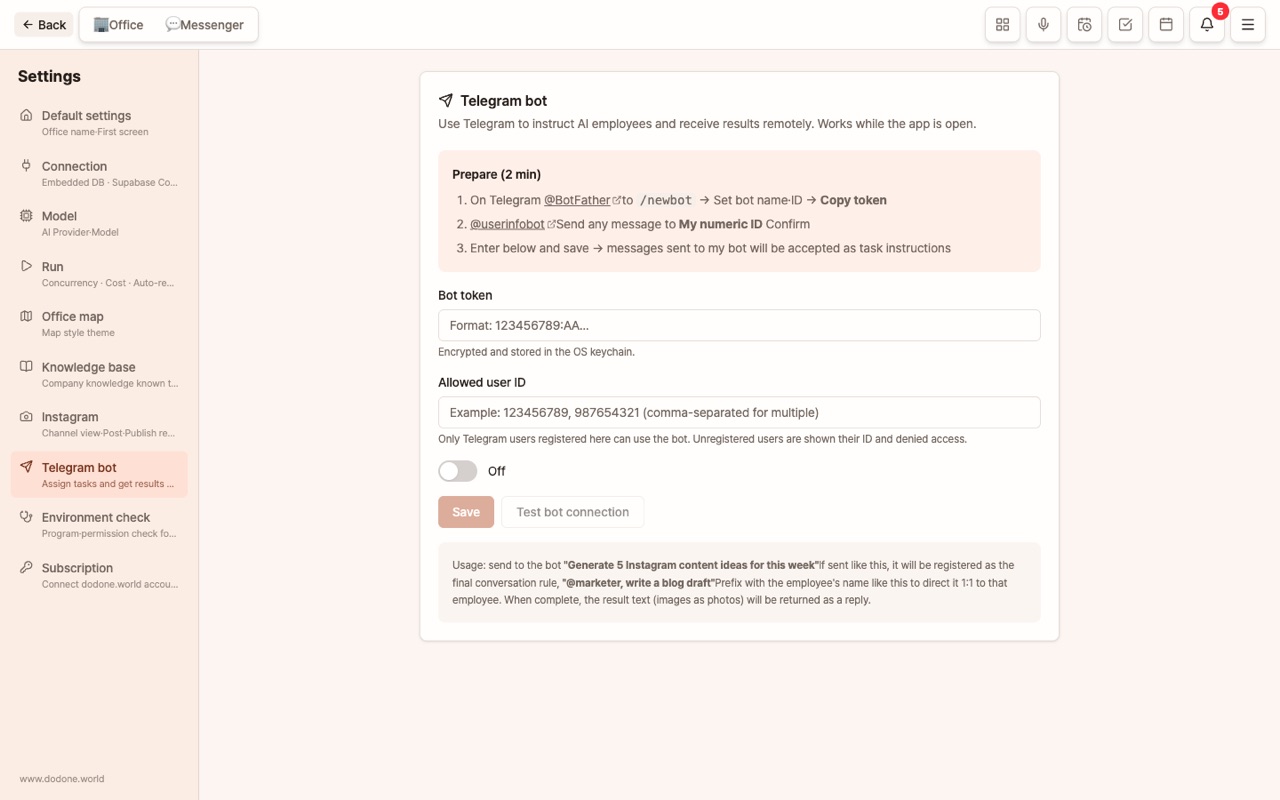
- In Telegram, search for @BotFather, send
/newbot, and set a name to receive your bot token. - Send any message to @userinfobot to get your user ID (a number).
- In DoDone, go to Settings > Telegram, enter the bot token and allowed user ID, then turn on usage.
- Try sending a message to your bot in Telegram. Only the allowed ID can use the bot.
How to Use
- Just type to message the Master, or use
@EmployeeName ...to instruct a specific employee. - Results (text, images, files) will be sent to Telegram. Scheduled results are also delivered.
- Check status, recent messages, and errors in Settings > Telegram’s diagnostics screen.
Tips for Use
- For tasks with fixed days and times like “Weekly Report every Monday 08:30,” the Scheduler is perfect.
- If you’re often out of the office, connect Telegram. While on the move, send
@Copywriter 3 Instagram captions for todayand you’ll get results before you arrive.
FAQ
Q: Can I receive files via Telegram?
Yes. Completed deliverable files will be sent.
Q: The bot isn’t responding.
Check the connection status and last polling time in Settings > Telegram. You need all three: bot token, allowed user ID, and usage turned on. The DoDone app must also be running.